
Why My “Software Engineering” Diploma from 10 years Ago Outperforms Modern SEO Plugins:
I have zero corporate experience. I have never worked a 9 to 5 job. After 10yrs staying away from the tech world-teaching students, and raising my kid – I decided to build my first website. First I go through some tutorials but its not enough to understand discussed with AI take suggestion, I picked that which was good in my opinion then start a designing. Use your logic and critical thinking do not totally depends on social media’s tutorials or AI suggestions after all its your task you have to involve. Here is my journey go through it and discussed it.
I didn’t know WordPress. I didn’t SEO. But I knew Logic.
Back in my institute days, I was always the “Team Leader” who handled the planning, the execution, and the final zipping of project files. That leadership instinct stayed with me.
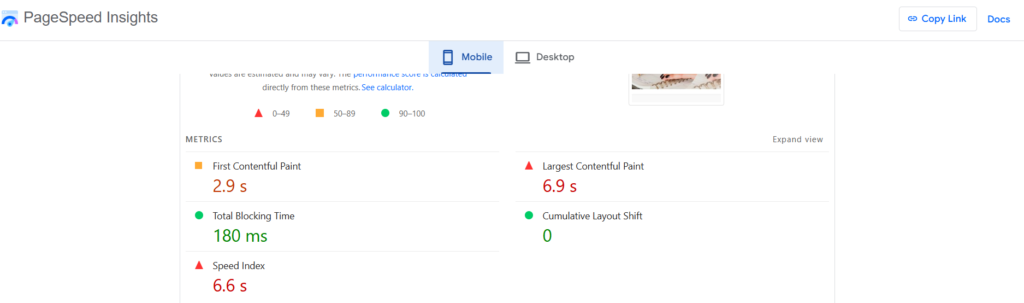
- Here is the result of applying ” Engineering Logic” to a 3 month old website:
- 100/100(approx.) lighthouse Score on Elementor (Free version).
- Traffic from 10+ Countries(USA, Netherlands, Singapore etc.)
- GA4 Data:
- 342% increase in Views
- 220% Growth in Active Users
- 303% Surge in Event Engagement
How did I do it without “Pro” plan and create experience in “SEO”?
- Manual Control over Auto-Settings: I unlinked Elementor’s auto margin/padding. Automatic values are a trap for Cumulative Layout Shift(CLS). I manually set every unit. Like if Container’s Width and Height in pixels or in percentage than margin and padding are linked when user open website in different resolution’s devices then CLS happened due to this the website content looked not so good in a different devices.
- Relative Units (VW) over Pixels(PX): Instead of forcing fixed sizes, I used viewport width to ensure the layout scales perfectly on every device. No more broken buttons.
- Identifying “Ghost Containers”: Some times we left empty containers in page and we didn’t noticed this when you changed the values of other containers this empty containers value create conflicts so cleaned the DOM tree. Every empty container is a burden on performance. I deleted them to keep the code lean.
- Human SEO : I rejected the plugin’s autogenerated excerpts. I wrote every meta-description myself to ensure Semantic Clarity. Plugins meta data is rotted data or many times repeated data or trending words its looks that SEO is old. So write your own meta data without any hesitation.
- And Purge All Cache every time i visited to my site.
- Take suggestion from AI if you are new to website developing but didn’t follow blindly Some time AI data is old and you take suggestion from and old data is creating a issue in a content so think smartly.
Conclusion
To design a website in WordPress is not only a Drag & Drop methods And neither always fault of a plugins sometimes you need to pay attention on each and every aspects of a website if you are developer or designer why are are you in hurry take a time check the codes then blame anything else.
If you are new to website designing in WordPress don’t panic it is simple to draw WordPress website but calmly not in hurry. When you install a plugins first check the popularity and authenticity of a particular plugins don’t rushed for those plugins which was promoted by some influencers. Check it manually comments , ratings etc. of plugins.
P.S.
I might be new to the industry, But I am not new to PROBLEM SOLVING. Be a problem solver by this you create a good design technically.
If you are struggling with a slow website or low engagement, remember: You don’t need a mehngey(Costly)plugins or others unnecessary things. You just need a developer who understands the Logic behind the code.